
Table of Contents
Answer “When will it ship?” with the employee’s own permissions
A customer asks a sales rep about delivery. The rep types “Find the scheduled ship date for order A-1042” in the chat they already use. They need a date from the order system and a link to the record. For this user, MCP works when that exchange succeeds under their own account. Someone else may have entered the server URL weeks earlier.
Model Context Protocol (MCP) lets a chat application discover external tools and invoke them with defined arguments. Imagine an existing order service described by OpenAPI and exposed through Amazon Bedrock AgentCore Gateway. Orders, roles and sample connection names below are illustrative. Product instructions are based on official documentation consulted on November 24, 2026. They have not been tested in paid tenants across these vendors. [1]
| Reader | What to hand over | Evidence of adoption |
|---|---|---|
| Individual subscriber | Eligible plan, setup screen, endpoint and first question | One of their orders is returned |
| Customer IT and makers | Network route, authorization, scopes, rollout group and shutdown procedure | An ordinary pilot member can use it |
| Employee | Published app name, sign-in steps and support contact | They can open the source and verify the answer |
| Service provider | Tool contract, tenant boundary, acceptance tests and support owner | Access can be withdrawn when a contract ends |
How much of the OpenAPI service can stay as it is?
Register the order API as an OpenAPI target. The address customers enter is the Gateway MCP endpoint. Keep the REST handler, database and links to individual orders, and select the operations to expose. A REST record URL and the OpenAPI document itself serve different purposes. Check the supported schema and parameter features. An OpenAPI security declaration does not configure outbound authentication. Check complex array serialization and cookie parameters before promising compatibility. [2]
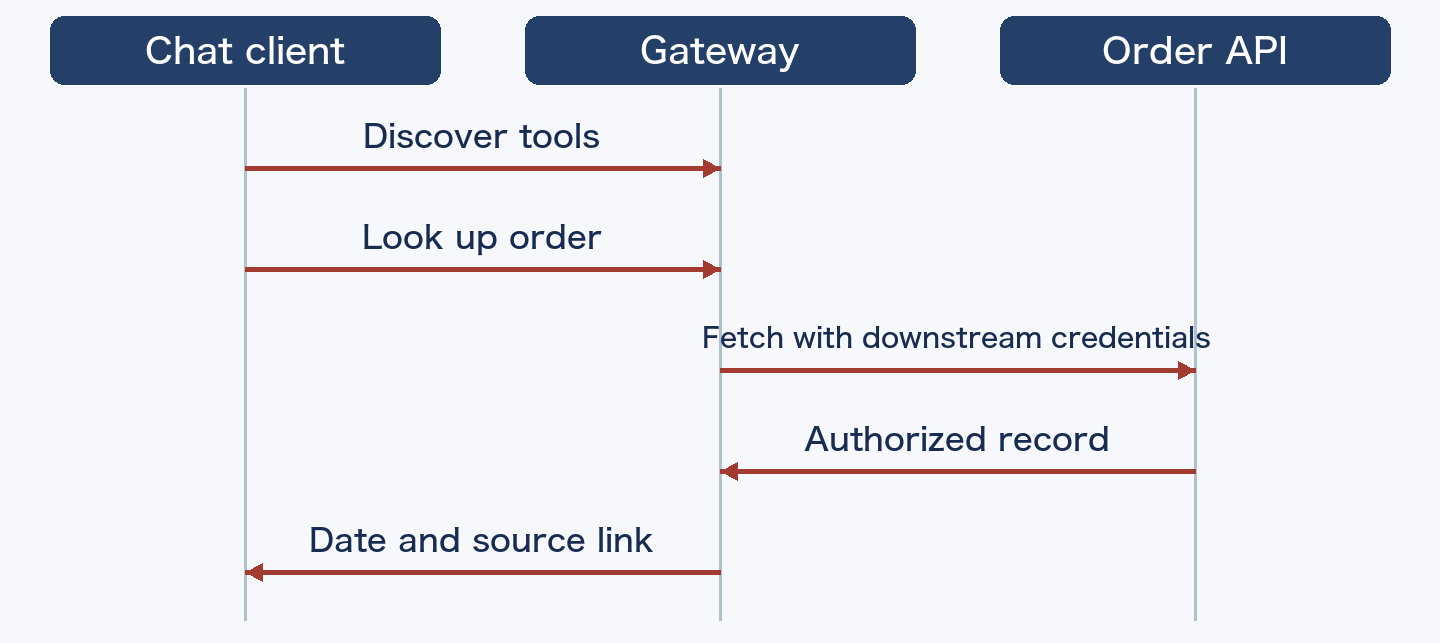
Figure 1. The client submits an order ID and the API enforces record access.
Start with one operation that reads a shipping estimate by order ID. Accept order_id and return the ID, scheduled date, time zone, last update and source link. Represent an unscheduled order explicitly. Derive the customer account from the authenticated identity. If two customers both have an A-1042, a database lookup keyed only by order number cannot enforce that boundary.
Reuse existing row-level checks if the gateway can call the API with the right identity. A service-wide key or a free-form query interface may justify a small adapter. Constrain its inputs, verify membership and omit addresses from a shipping-date response. Inspect the actual tool list before exposing the full administrative API. Can a reader distinguish looking up an estimate from committing a shipment by the tool names and descriptions alone?
Follow the OAuth exchange and identify what the user approves
An active browser session at the order service does not give the AI client an access token. The authorization server establishes which client can perform which operations for a given user. Organization approval, user sign-in and consent, and permission to read a particular order are separate decisions. The diagram shows a representative HTTP MCP flow. Pre-registration and prior grants can remove some visible steps. [3]
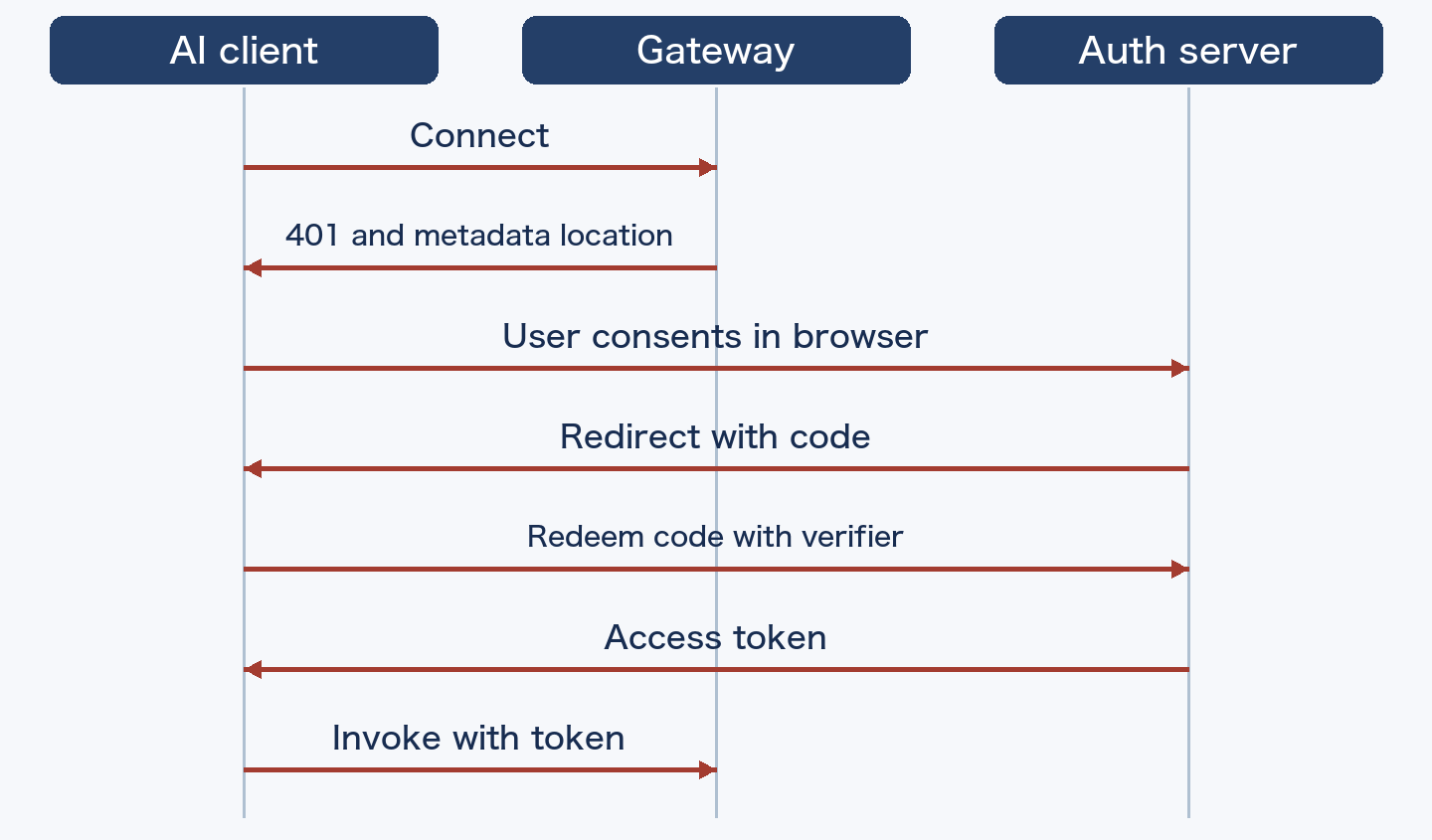
Figure 2. First connection, consent and the authenticated retry.
An initial 401 can be expected. Protected resource metadata identifies the authorization server, whose metadata supplies the authorization and token endpoints. The user signs in through a browser. An authorization code returns to the registered redirect URI. PKCE binds the challenge sent at the start to the verifier supplied during exchange. Check the token’s audience, expiry, issuer and scopes at the gateway. [3][4]
Give administrators the public HTTPS URL, client registration method, accepted redirect URI and required scopes. Pre-registered client IDs, client metadata documents and dynamic client registration (DCR) require different support from both parties. Register the exact callback displayed by the client. Deliver a confidential client secret through an administrator channel and omit it from employee instructions. [3]
There is another decision on the hop from Gateway to the order API. OpenAPI targets support API keys, OAuth and SigV4 for compatible AWS services. Client credentials identify an application. For employee-specific permissions, evaluate supported delegated flows or an exchange for a downstream-scoped token. Verify which principal the API actually sees. Do not blindly forward the inbound token to another audience. With a shared downstream key, a trusted layer still has to enforce user, tenant and record access. [5][2]

A shared counter returns only the record the user may see.
ChatGPT and Claude assign personal setup and workspace rollout to different people
ChatGPT web. In the Plugins interface select the plus sign and Add custom MCP server. Enter the name, HTTPS endpoint and authentication details, review the warning, create the plugin and inspect the tools. Try a test order. In the legacy interface use Settings or Workspace settings, then Apps, Create and Scan Tools. Include both screen names in customer instructions while the two experiences coexist. [6]
Business admins and owners create and publish. Enterprise/Edu can delegate creation and testing to selected roles, while admins or owners publish and control access. Verify discovery and personal sign-in as an ordinary member. For personal Pro accounts the official FAQ describes read/fetch access to custom servers. Business documentation does not establish the same rights or write support for Free or Plus accounts. Publishing in one workspace also differs from distributing through a public directory. [6]
Claude chat. An individual opens Customize, Connectors and Add custom connector, enters a name and the full URL, and checks the detected authentication settings. Enable the connector from the conversation’s plus menu. Free accounts have a one-custom-connector limit. Team owners or primary owners can add it in Organization settings. Enterprise can also delegate the relevant library-management permission. Each member then chooses Connect and signs into their order account. A fixed key in a shared header gives users the access of that credential. [7]
Claude Code. A technical pilot can run “claude mcp add --transport http orders https://orders.example/mcp” and inspect status and sign-in with “/mcp” in a session. Replace the illustrative URL. Keep secrets out of project-shared configuration and check managed policy. Claude’s hosted remote connector originates from Anthropic’s cloud and uses HTTPS port 443. Success from a CLI on a corporate VPN does not establish reachability from hosted Claude. [8][7]
Give Microsoft 365 Copilot Chat users a published agent
A Microsoft 365 organization can have a maker attach MCP tools to an Order Lookup agent in Copilot Studio. Employees then open the agent in Copilot Chat. Start with the Power Platform environment administrator and agent maker. Ask employees about their work account and group assignment. This route is specific to Microsoft 365 and is distinct from consumer Microsoft Copilot and GitHub Copilot. [9][10]
- The maker selects the environment and agent, opens Tools and adds an MCP server. Use an existing connector or enter the new connection’s name, description and server URL. Inspect the discovered operations. [9]
- Configure per-user OAuth for an authenticated service. Use discovery and DCR where supported. For manual setup enter the authorization and token endpoints, client credentials and scopes. Register the callback supplied by Copilot Studio before testing sign-in. [9]
- Test as an ordinary user and publish the agent. Configure the Microsoft 365 channel and sharing group, obtain any required organization approval and distribute an agent link or name. Check whether tool changes require republishing. [10][11]
- Administrators should check environment policies, maker licensing, the employees’ Copilot entitlements and any consumption billing arrangement. Opening Copilot Chat alone does not determine the cost of this agent. Size the rollout using pilot consumption. [12]
Choose among personal testing, public distribution and enterprise use in Gemini
For a direct test in Gemini on the web, Google documents Settings, Gemini Apps Developer Mode, Choose an app and Create new. Enter the public HTTPS endpoint. Supply client details in additional settings when OAuth requires pre-registration. Inspect discovered tools, test sign-in and a lookup, and check the Event Log for the actual call. For broader distribution, register in Google Connected Console, add testers and proceed through review and publication. A working developer-mode session does not make the app generally discoverable. [13][14]
In Google Cloud’s Gemini Enterprise, an administrator creates a custom MCP data store. Its “actions” correspond to MCP tools. Choose the project and app, supply the Streamable HTTP HTTPS endpoint and OAuth configuration, and select Verify Auth. Enable the necessary actions, associate the store with the intended application and test sign-in and lookup as a member. Google recommends limiting enabled actions to 100 at once. Employees need no developer-mode setup, but the administrator owns the app-to-store mapping. A company using Gemini in Workspace should first identify the actual product entitlement, Cloud project and responsible administrator. [15]
Diagnose the connection by its last successful step
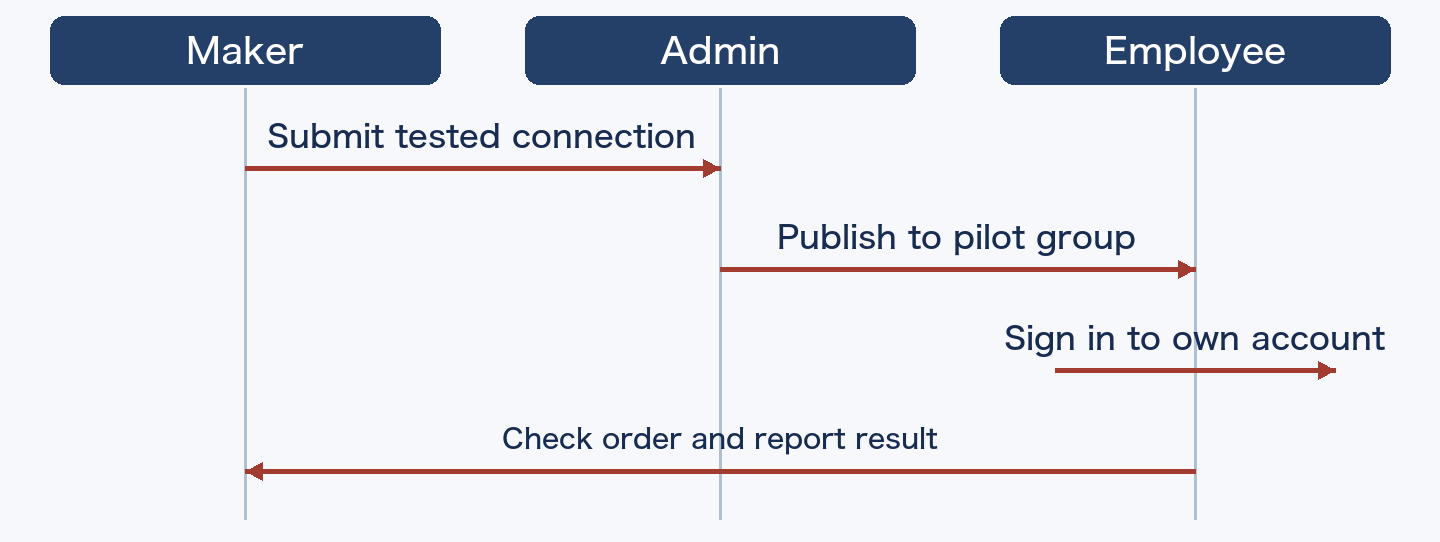
Figure 3. Pilot rollout ends with an employee verifying the result.
| Symptom | Inspect first | Distinguish |
|---|---|---|
| No add button | Plan, signed-in workspace and maker role | A private draft versus a published connection |
| Endpoint unreachable | Route from host, HTTPS, path and transport | Employee device versus AI vendor network |
| Consent never returns to chat | Exact callback, client ID and tenant | Successful login versus successful code exchange |
| Works today, asks for login tomorrow | Expiry, refresh grant and requested scopes | Intended reauthentication versus missing refresh configuration |
| Tools appear but an order fails | Inbound gateway and downstream API logs | Inbound permission versus record access |
| Only admins see a new action | Discovery refresh, approval, published version and group | A change visible only in the draft |
Ask support reporters for product, plan, workspace, timestamp with zone, failed stage and correlation ID. Correlate gateway and backend events without logging secrets or order bodies. An authentication success metric alone would count a cross-tenant order mix-up as a successful call.
What to send customers and what to test before release
An employee announcement might read: “You can now look up the scheduled ship date for orders you can view in the order system. In company Copilot Chat, open Order Lookup and connect your usual order account the first time. Ask ‘Show the ship date and source link for order [one of your orders].’ Check the date against the linked record. If the agent is missing, tell the service desk which work account you used and the time.” Adapt the published name, host, group and support contact for each customer.
Give administrators a separate sheet listing the endpoint, traffic origin, authentication choices, reason for each scope, data destinations and retention policy, and the person who can disable access. A read-only launch should remain read-only even without a chat confirmation prompt. Before adding shipment confirmation, design its additional permission, consent, change notice and duplicate-execution protection.
Verify a rep can retrieve an assigned order, cannot retrieve an unassigned one or another tenant’s same-numbered order, and sees an explicit unknown when a date is unscheduled. Remove a member’s rights and reconnect to confirm access stays revoked. Test refresh the following day, republishing after a tool change, and disconnecting a single customer. The acceptance evidence is a correct result for a working employee and an appropriate denial after their responsibilities change.
References
- [1]AWS · Gateway workflow ↩
- [2]AWS · OpenAPI schema targets ↩
- [3]MCP · Authorization ↩
- [4]AWS · Inbound authorization ↩
- [5]AWS · Outbound authorization ↩
- [6]OpenAI · Connecting custom MCP servers ↩
- [7]Anthropic · Custom connectors ↩
- [8]Anthropic · Claude Code MCP ↩
- [9]Microsoft · Connect an existing MCP server ↩
- [10]Microsoft · Publish to Microsoft 365 Copilot ↩
- [11]Microsoft · Add tools and resources ↩
- [12]Microsoft · Manage agents in Copilot Chat ↩
- [13]Google · Gemini Apps Developer Mode ↩
- [14]Google · Register, test and publish ↩
- [15]Google Cloud · Custom MCP data store ↩

NOVEL SERIES VOL.1
The World Became Slightly Farther Away
The world may not change, but distance can.
A story about a man who cannot treat promises lightly, and the people he meets.The sequel, Clouded Glass, is out too. Start here.
View on Amazon
Jijoden.com
Your life is worth writing.
There is a truer self you can tell only to AI.Gather fragments of memory into a single story.
Take a LookRelated Articles
What Can You Share with AI? Approval Criteria for Enterprise Code and Customer Logs
Authorize enterprise AI use with six repository acceptance criteria, log-sanitization examples, contract decisions and a reusable approval template. Primary sources checked September 19, 2026 distinguish permitted work, prohibited transfers and case-specific review.
Will Figma Disappear in the AI Era? What Remains When Design, Code, and Debate Converge
A 2026 evidence-based analysis of whether AI-generated working interfaces make Figma obsolete, covering Code Layers, agents, MCP, economics, competitors, and the workflows that will actually disappear.
AWS’s AI Counteroffensive: How Amazon Reframed the Perception That It Was Behind
A detailed look at how Amazon moved from being seen as late to generative AI into a central AI infrastructure contender through AWS, Trainium, Bedrock, Anthropic, and OpenAI.
Figma × Anthropic “Code to Canvas”: A New Roundtrip from Running UI to Editable Design
A primary-source-based analysis of Figma and Anthropic’s Code to Canvas: runtime UI capture mechanics, MCP strategy, continuity with HTML-to-Figma approaches, workflow impact, security governance, and what to watch next.
What is RAG (Retrieval-Augmented Generation)? Complete Guide to Generative AI, AI Agents, and MCP
A beginner-friendly guide to RAG (Retrieval-Augmented Generation), explaining its differences and relationships with Generative AI, AI Agents, and MCP, including how ChatGPT's web search relates to RAG.
From the Pocho Lab