
Table of Contents
1. I Woke Up and My Mac Was Frozen
Let me lead with the conclusion. Depending on how you use it, the macOS ChatGPT.app (Codex) can eat 14GB of memory and freeze a 16GB Mac overnight. The cause is a combination of known app-side bugs and your own usage patterns. You cannot fix the app's bugs yourself — but if you address three things on your side, it will run stably even on a 16GB MacBook Air. This article is the full record of the measurements and the fix.
One morning, my M4 MacBook Air (16GB RAM) was barely responding. macOS had thrown up "Your system has run out of application memory" and force-paused several apps. Activity Monitor showed ChatGPT.app occupying 14GB. All my overnight automation jobs (scheduled data collection and monitoring) had been collateral damage. Real harm was done.
This wasn't a case of "one heavy operation." It was the classic leak signature: a cumulative delta that grows with elapsed time. Swap ballooned at the same pace. A restart fixes it — and a few days later you're back in the same place. This isn't an accident; it's a structure.
2. Who to Suspect First: Checking the Known Bugs
Before blaming my own environment, I checked whether the same thing was happening to other people. It was — the openai/codex repository has many issues of exactly this type, all unresolved[1].
| Issue | Symptom | Scale |
|---|---|---|
| #29510 | app-server balloons when local rollout history is huge | 30–40GB |
| #21134 | High CPU/memory on long active threads, SQLite log churn | 4.4GB + 64% CPU |
| #26015 | Memory not released after turns finish on long threads | Held until restart |
| #27164 | Runaway memory/swap with Computer Use on M4/16GB Mac | System instability |
| #20740 | Memory grows to 75GB+ during a basic session | 75GB+ |
| #26738 | Computer Use restore triggers memory runaway | 172GB |
The common structure is this: Codex stores each conversation's full history locally as a JSONL file called a rollout. The app-server (the app's resident background process) loads that rollout into memory with no size limit when opening or resuming a thread, and does not release it when the turn ends. As long as a huge history file exists, no matter how many times you restart the app, you will end up back in the same place.
If the story ended here, the conclusion would be "endure until OpenAI fixes it." But when I actually measured things, the entity diligently growing that huge history file every day was my own configuration.
3. The Real Culprit: Single-Thread Automations
I run monitoring jobs every few minutes via ChatGPT.app's Automations (scheduled runs). The problem was the design: an Automation can pin its output thread (target_thread_id), and my main job was configured to append to one single thread forever.
Here are the measured numbers.
- Continuous lifetime of the single thread: 11 days
- Its rollout file: 399MB (growing ~35MB per day)
- Accumulated turns: 7,643
- Input per turn: ~180k tokens (mostly cached, but the entire history is dragged along every time)
- Cumulative input tokens: 3.8 billion
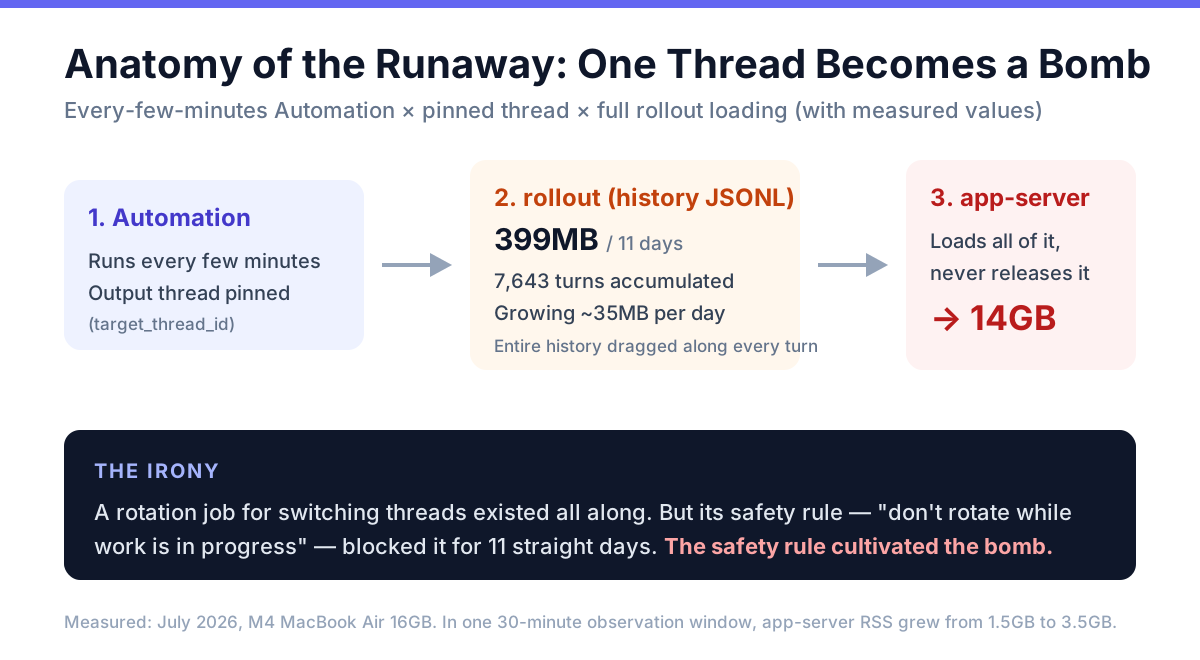
Figure 1: Anatomy of the runaway. An every-few-minutes Automation appends to a single thread; the rollout grows without bound; the app-server loads all of it and never lets go.
The ironic part: I had even built a rotation Automation to periodically switch to a fresh thread — but I had given it a safety condition, "don't rotate while work is in progress," and that condition had blocked rotation for 11 straight days. A safety check designed to protect local state ended up cultivating a much bigger danger: memory exhaustion taking down the entire Mac. A design lesson worth engraving.
What happens when the app-server loads this rollout? In just the 30 minutes I spent investigating, the app-server's RSS (resident memory) grew from 1.5GB to 3.5GB with CPU pinned at 100%. Extrapolate over an 8-hour night and you reach 14GB — which is exactly what happened.
4. How to Check Your Own Environment
If you suspect the same symptoms, here are the exact commands. All read-only.
First, the app-server's actual memory usage:
ps axo pid,rss,command | grep 'ChatGPT.app/Contents/Resources/codex' | grep app-server
# RSS column (KB) in the multi-GB range is a warning sign; hundreds of MB is healthy
Next, look for overgrown rollouts:
du -sh ~/.codex/sessions
# find huge files that are still being appended to
find ~/.codex/sessions -name 'rollout-*.jsonl' -size +50M -mtime -2 -exec ls -lh {} \;
Finally, log DB bloat (the issue #21134 symptom):
ls -lh ~/.codex/logs_2.sqlite
# mine had grown to 2.2GB
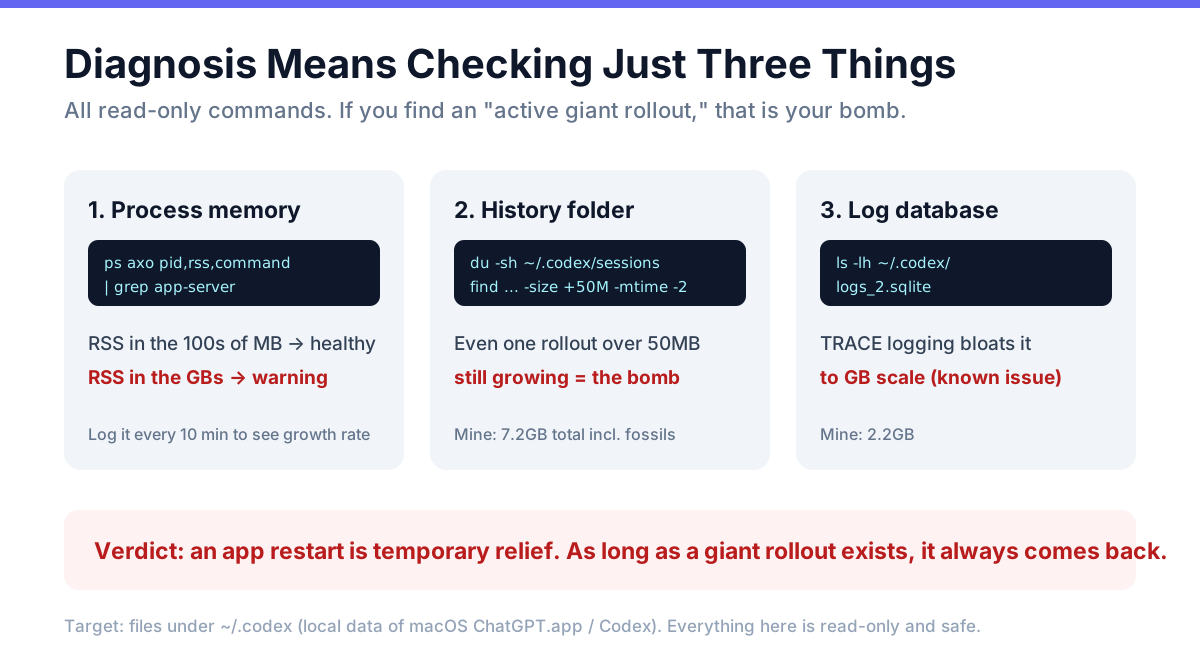
Figure 2: Three observation points — process resident memory, total rollout history plus any "active giant" file, and the log DB size.
The verdict rule is simple: if even one rollout is over 50MB and still being appended to, that file is your bomb. Restarting the app doesn't help — the moment that thread wakes up, the ballooning resumes.
5. Fix #1: Force Thread Rotation by Size
The root fix is to never build the bomb: once a rollout exceeds a size threshold, switch to a fresh thread regardless of business conditions.
I added an actual size measurement to my rotation-decision script. When the threshold (32MB) is exceeded, it overrides the business-driven blocking conditions and allows rotation. The threshold has a rationale: set it slightly below one day's growth (~35MB) and history size caps out at little more than a day's worth in the worst case. The rotation itself is done by an existing scheduled job (twice daily).
# The decision logic (pseudo-code)
size_mb=$(du -m "$rollout_file" | cut -f1)
if [ "$size_mb" -ge 32 ]; then
  rotate_allowed=true   # takes precedence over business blockers
fi
One prerequisite: if your monitoring job's prompt is self-contained — re-reading the latest local state every run — then switching threads loses essentially zero context. Put differently, write Automation prompts to be self-contained rather than history-dependent; that is what makes this rotation policy safe.
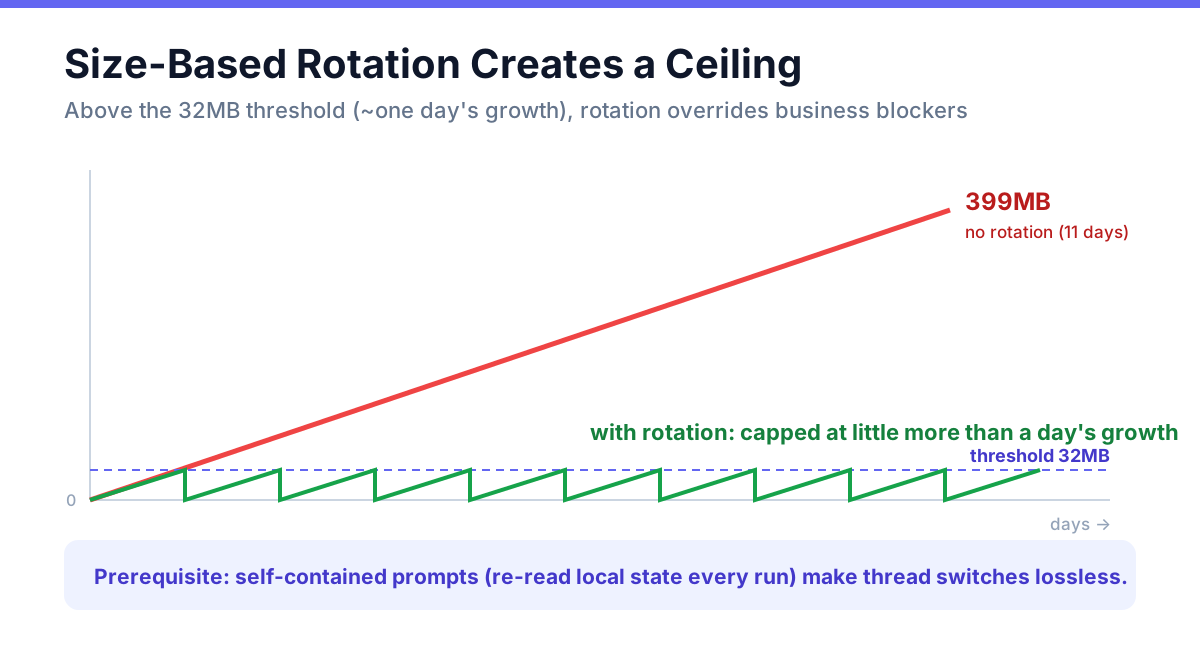
Figure 3: The effect of size-based rotation. History that would climb straight to 399MB becomes a sawtooth capped at the 32MB threshold.
6. Fix #2: A Memory Watchdog — and the AppleScript quit Trap
Rotation stops new bombs, but the app-side bug itself remains. So the second layer is a launchd watchdog that checks the app-server's RSS every 10 minutes: at the warning level (5GB) it logs and notifies; at the critical level (8GB) it automatically restarts ChatGPT.app.
Here I stepped on a trap specific to unattended operation, and it's worth sharing. If you politely quit via osascript —
tell application "ChatGPT" to quit
— ChatGPT.app raises a confirmation dialog ("quitting will stop your automations") and stops right there. At 3 a.m., no human is available to click that button. Worse, in a launchd context, macOS's privacy layer (TCC) may silently block sending AppleEvents at all[2]. In short, the polite quit is nearly useless when nobody is watching.
The answer is simple: send SIGTERM from the start.
pkill -TERM -f 'ChatGPT.app/Contents/MacOS/ChatGPT'
sleep 60   # allow shutdown handlers to run
open -a ChatGPT
SIGTERM raises no dialog, the app's shutdown handlers still run, and Automations resume on schedule after relaunch. I verified this with a live-fire test: the AppleScript path stalled on the confirmation dialog, and the SIGTERM path completed. If you design unattended auto-restarts, do not rely on AppleScript quit.
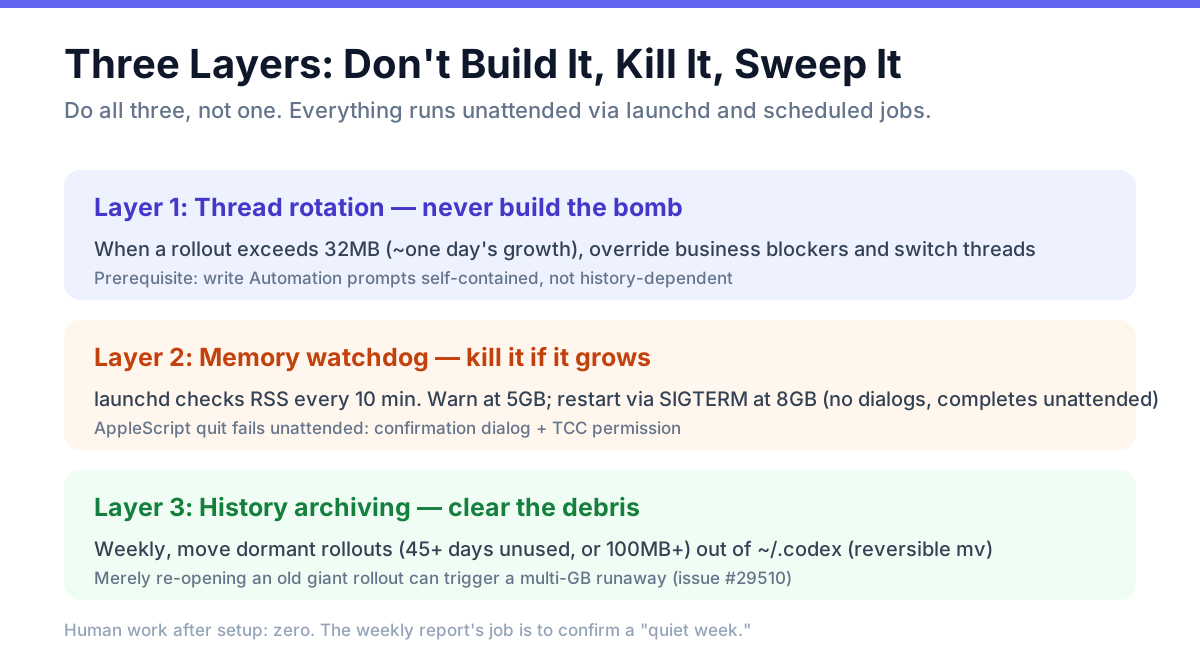
Figure 4: Three defense layers. Don't build the bomb (rotation), kill it if it grows (watchdog), and clear the debris (archiving). Do all three, not one.
7. Fix #3: Archive Dormant Rollouts
The third layer is cleanup. As issue #29510 shows, the app-server can balloon to tens of GB merely by re-opening old giant rollouts. My ~/.codex/sessions contained fossil rollouts of 1.8GB and 895MB — 7.2GB in total.
I wrote a script that moves rollouts unused for 45+ days, or over 100MB and unused for a few days, out of ~/.codex (a reversible mv, not deletion) and scheduled it weekly. The first run took the folder from 7.2GB down to 2.1GB. The trade-off is that archived threads can no longer be opened from the app's UI — but in practice, you never re-open a weeks-old monitoring-log thread.
8. Results, and a Runbook You Can Copy
Measured results since deploying all three layers:
- app-server RSS: steady around 1GB (previously drifting to several GB, 14GB overnight)
- CPU pinned at 100%: gone (no more giant-thread reprocessing)
- Human intervention required: zero (rotation, monitoring, restarts, archiving and weekly reports all run via launchd and Automations)
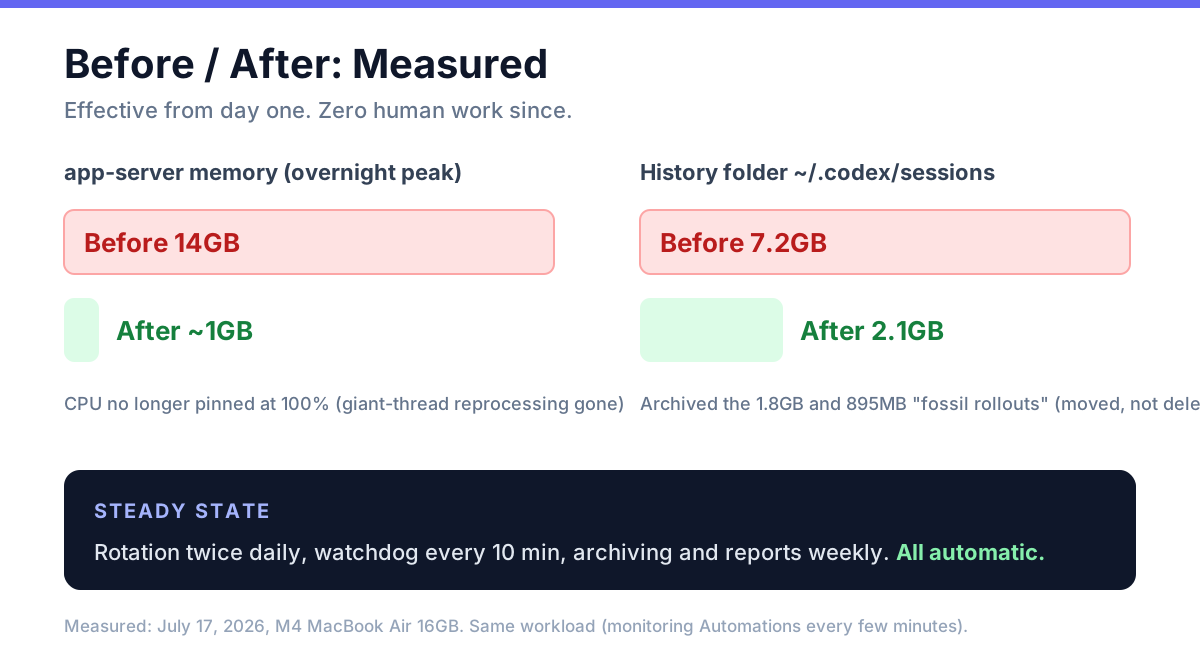
Figure 5: Before and after. The app-server that hit 14GB overnight now idles around 1GB; the 7.2GB history folder is down to 2.1GB.
As an operational checklist:
| When | What | Target |
|---|---|---|
| At setup | Check whether any Automation pins its output thread | If pinned, add rotation |
| At setup | Install the watchdog (launchd); restart via SIGTERM | Warn 5GB / restart 8GB |
| Weekly (automated) | Archive dormant rollouts | Keep sessions under a few GB |
| Weekly (automated) | Report RSS trend and restart count | A "quiet week" is the healthy signal |
| Anytime | Habitually check app-server RSS with ps | Hundreds of MB = healthy |
9. Conclusion: You Can't Fix the Bug, but You Can Shrink the Input
Three lessons from this incident.
First, verify "the app's bug" and "your own usage" independently. If I had stopped at "there's a known bug, wait for OpenAI," my Mac would still be freezing every night. The trigger for the bug — the giant rollout — was my own configuration, and that part I could fix today.
Second, periodically re-ask what your safety conditions are actually protecting. The cautious rule "don't rotate threads while work is in progress" ended up cultivating a bomb that took down the whole machine. Local safety and whole-system safety sometimes collide.
Third, unattended automation must not trust human-in-the-loop UI. Confirmation dialogs, AppleScript permissions, polite quits — none of them work at 3 a.m. Choose paths that complete deterministically at the OS level, like SIGTERM.
The ChatGPT.app memory problem itself remains open on OpenAI's issue tracker[3]. Even so — keep the input small, kill it when it grows, sweep up the debris. With these three layers, even a 16GB Mac can get through the night.
参考文献 / References
- Codex app-server can grow to 30-40 GB when local rollout history is huge — openai/codex #29510
- Codex Desktop becomes unusable on long active threads — openai/codex #21134
- Memory not released after turns finish — openai/codex #26015
- Runaway memory/swap during Computer Use on macOS (M4/16GB) — openai/codex #27164
- Codex memory grows to 75GB+ during basic session — openai/codex #20740
- Computer Use can trigger memory runaway to 172GB — openai/codex #26738
- Mac OS ChatGPT application bug - memory leak — OpenAI Developer Community
References
- [1]As of July 2026. All of these issues remain open, with no root fix or official workaround from OpenAI that I could confirm. Reproduction conditions vary by version and environment, so I recommend measuring your own machine (see Section 4). ↩
- [2]TCC (Transparency, Consent, and Control) is macOS's privacy mechanism. Sending AppleEvents to another app requires an "Automation" permission grant; when executed from a GUI-less context such as launchd, the approval dialog may never appear and the call can fail silently without the permission. ↩
- [3]The full-file rollout loading, the unreleased memory after turns, and the TRACE-log SQLite bloat all stem from the app's internal implementation and cannot be root-fixed by users. The three-layer approach in this article is about minimizing the bug's trigger conditions. ↩

NEW NOVEL 2026/08/01
Clouded Glass
Polishing is not about force.
Volume two of The World Became Slightly Farther Away.Five stories that can also be read as a starting point.
View on Amazon
Jijoden.com
Your life is worth writing.
There is a truer self you can tell only to AI.Gather fragments of memory into a single story.
Take a LookRelated Articles
GPT-6 Astra Arrives: What Changes When You Put It to Work in Codex?
Our first article produced with Astra examines GPT-6 in Codex, its differences from GPT-5.6, comparisons with Fable 5.1 and Opus 5, ARC-AGI-3 testing conditions, international reactions, and the AGI debate. Sources checked September 6, 2026.
Why AGENTS.md Won by Standardizing Almost Nothing — The 18-Month End of the AI Coding Rules War
Why did a landscape of tool-specific instruction files converge on AGENTS.md, a standard with no required fields? This evidence-based history follows its path from Amp's singular AGENT.md to Linux Foundation stewardship, rule-sync tools, invisible-Unicode attacks, and a practical 2026 setup.
Why the Benchmark King Breaks Code in the Field: The Real Reason Google Antigravity Isn't Catching On
Why does Google Antigravity cause regressions in the field? We explore the overwhelming cost performance of its $20 monthly plan and the mystery of why Google is lagging behind in AI coding agents, separating model intelligence from product quality.
What Is Loop Engineering? Designing Systems That Direct AI
Is prompt engineering ending? Using primary sources available as of August 2026, this article explains loops, context, harnesses, graphs, voice-driven development, long-horizon agents, and human oversight.
Google Sheets Looks Huge Even Though Chrome Says 100%: Fixing a Ghost Zoom Entry in Chrome Preferences on macOS
Diagnose and repair a macOS Chrome profile where Google Sheets and Docs render at an apparent 125% scale even though Chrome and the editor both report 100%. Includes devicePixelRatio comparison, read-only Preferences inspection, a backup-first Python repair, and rollback commands.